Animal Crossing CV Template — Cozy Resume Builder
Build a cozy, playful resume with the free Animal Crossing CV template. Soft colors, clear structure, ATS-friendly tips and instant PDF download.
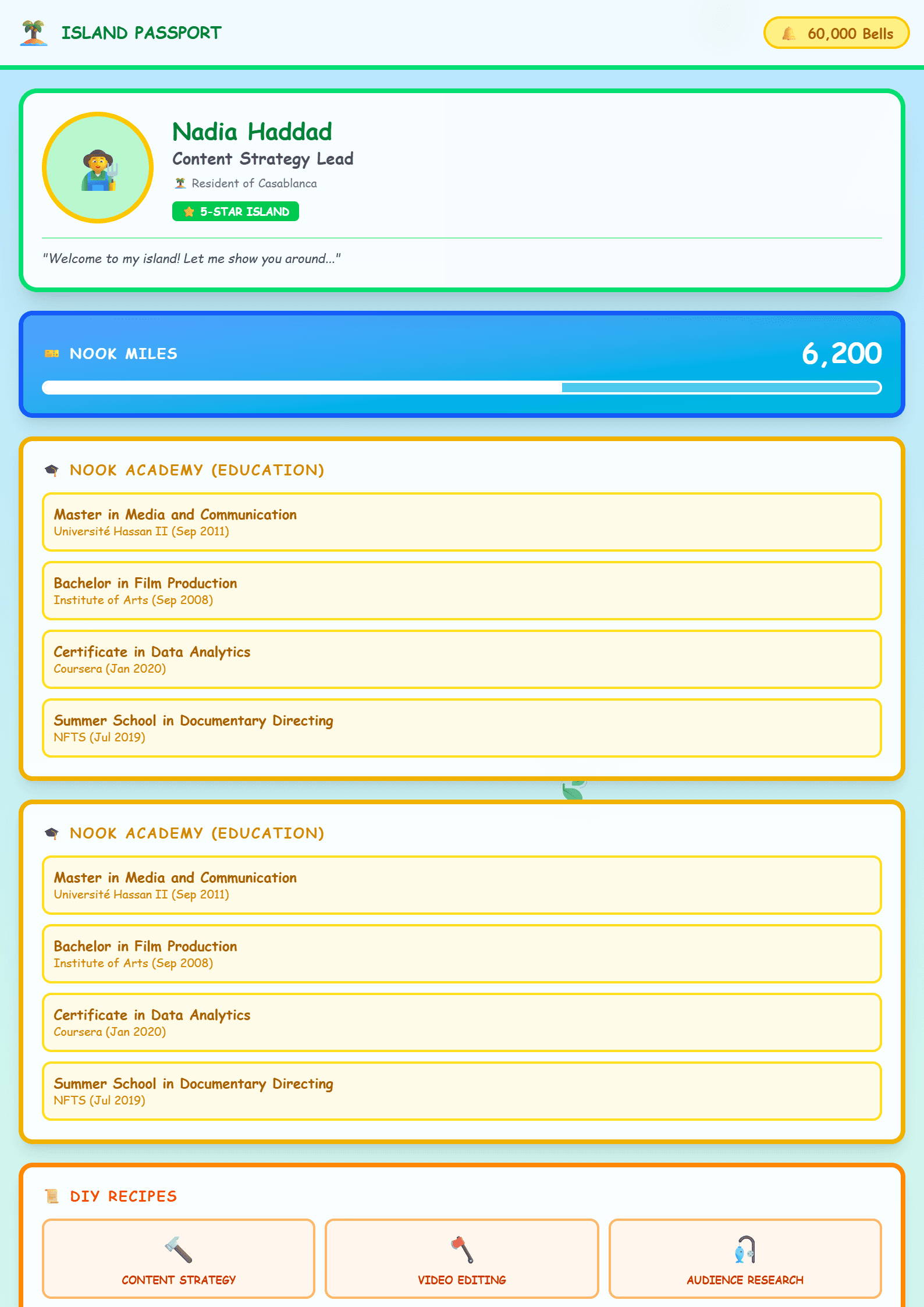
What Is the Animal Crossing CV Template?
The Animal Crossing template is a cozy, playful resume design inspired by the calm, community-driven world of the beloved life-simulation game. Instead of stiff corporate grids, it uses soft colors, gentle iconography and friendly typography to make your application feel warm and approachable. It is a full CV layout, not a sticker sheet: it still includes all the sections recruiters expect, from a professional summary to skills and education. If you want a resume that stands out without looking chaotic, this is the template to try. You can start from the Animal Crossing CV template page and customize every block inside the editor.
Who Should Use This Template?
This design works best for people whose personality is part of their professional brand. Consider it if you are:
- A community manager, social media specialist or content creator applying to lifestyle, gaming or youth-oriented brands.
- A customer support agent, hotel receptionist or event coordinator who needs to show warmth and patience.
- A teacher, tutor or childcare professional where a friendly tone matters.
- A student or career changer who wants a memorable first impression without years of experience.
- A designer or illustrator showing off an eye for color and layout.
If you are applying to a bank, a law firm or a large enterprise with strict screening, a cleaner option such as the ATS Friendly template will serve you better. You can also compare both approaches on the templates index.
How to Build Your Animal Crossing CV Step by Step
- Open the editor. Choose the Animal Crossing template and pick a soft palette — mint, peach, sky blue or cream all work well.
- Write your header. Keep your full name, target job title, city, email, phone and one portfolio link. Skip decorative nicknames.
- Draft the summary. Three sentences: who you are, what you do best, and the value you bring. Keep the cozy tone but stay concrete.
- List experience with results. Use the format: action verb + task + measurable outcome. For example, "Grew community engagement by 42% in six months."
- Add skills. Split them into hard skills (tools, software, languages) and soft skills (empathy, communication, teamwork).
- Include education and certifications. Add dates, institutions and any relevant coursework.
- Check readability. Run your draft through the Readability Analyzer to make sure the playful design did not hurt clarity.
- Export and proofread. Download the PDF, open it on your phone, and check that everything is aligned.
Practical Tips for a Cozy but Professional Resume
- Let the design support the words, not replace them. Decorative elements should never crowd the text.
- Keep fonts readable. A rounded font in headings is fine; body text should stay simple and at least 10-11pt.
- Use one accent color. Two or three pastel tones are plenty.
- Match the tone to the employer. A gaming studio will love the theme; a government office will not.
- Tailor keywords to the job post. Even friendly templates get screened. Use the Resume Keyword Optimizer to align your wording with the listing.
- Keep it to one or two pages. Recruiters spend seconds on the first scan.
Common Mistakes to Avoid
The biggest mistake is letting the theme overpower the content. Avoid cartoon logos in the header, avoid emojis in place of bullet points, and never hide contact details behind graphics. Another frequent issue is inconsistency: if your headings are playful, your bullet style and spacing should match. Finally, do not submit the same version everywhere. Save a themed version for creative roles and a plain version for formal applications. A quick check with the CV Score Checker before sending can catch layout and completeness problems early.
Final Thoughts
The Animal Crossing template proves that a resume can be both charming and professional. Used with discipline — clear structure, measurable achievements, tailored keywords — it turns your personality into an advantage rather than a risk. Build it once in the editor, then adapt the palette and tone for each application.
Like this template?
Use this template now — Free100% Free
No registration or watermark
Multi-Format Export
PDF, Word, PNG, JPG
ATS Compatible
Templates specifically designed to pass ATS systems and increase your chances.