ATS Executive CV Template for Senior Leaders
ATS Executive CV template for directors and C-level candidates: clean structure, metrics-driven bullets, and full compatibility with applicant tracking systems.
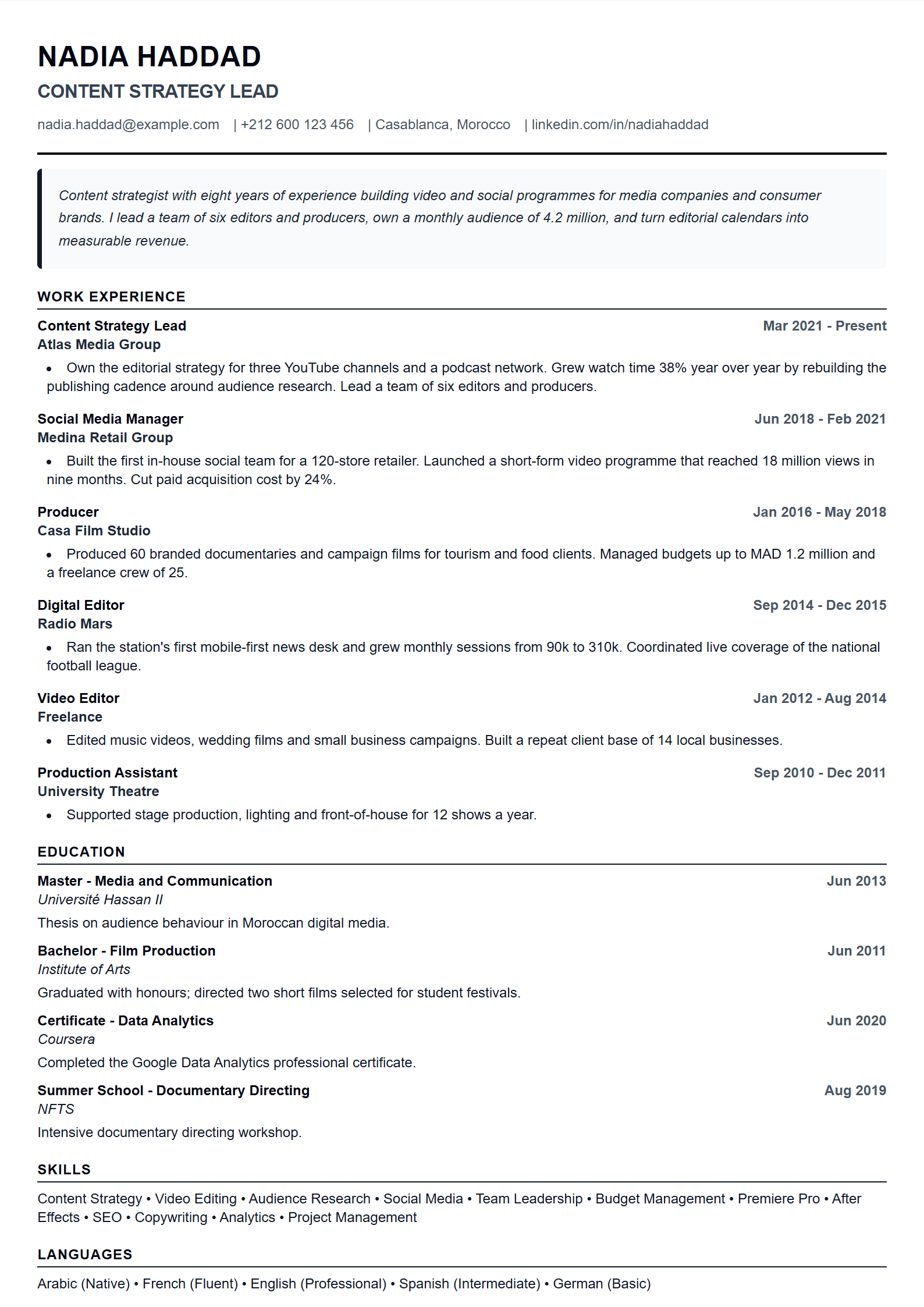
What Is the ATS Executive Template?
The ATS Executive template is a resume layout built for senior professionals who need to pass automated screening while still looking authoritative. It uses a clean single-column structure, standard section headings, and achievement-first bullet points, so recruitment software can parse every detail — job titles, dates, metrics — without confusion. Unlike decorative designs, it avoids tables, text boxes and graphics that break ATS parsing. If you are applying for a director, VP or C-level role, this template keeps the focus on results rather than decoration.
Who Should Use It
This template suits candidates with 8+ years of experience: department heads, directors, general managers, and executives in finance, operations, technology or consulting. It is also a strong choice for professionals switching into leadership roles, because it puts quantified achievements at the top of each position. If you are earlier in your career, a simpler format such as the ATS Friendly template may be a better fit.
How to Use the ATS Executive Template Step by Step
- Open the CV editor and select the ATS Executive layout.
- Fill in your contact block: full name, professional email, phone, LinkedIn and city.
- Write a 3–4 line executive summary that names your target role and your biggest measurable win.
- List each role with company, title, dates, and 3–5 bullets that start with an action verb and end with a number.
- Add a core competencies section with 8–12 keywords taken directly from the job posting.
- Include education, certifications and languages, then export as PDF or Word.
Practical Tips for Executive-Level ATS Success
- Use the exact job title from the posting in your summary and headline.
- Replace duties with results: "grew revenue 32% in 18 months" beats "responsible for sales."
- Keep the file name professional: Firstname-Lastname-CV.pdf.
- Avoid headers, footers, columns and images — many ATS systems skip them.
- Spell out acronyms once, then use the short form (e.g., Key Performance Indicators (KPIs)).
- Run your finished file through the ATS Resume Scanner before applying.
Common Mistakes to Avoid
Executives often overload the page with responsibilities instead of outcomes, or hide key data inside graphics. Another frequent error is using a creative layout for a corporate role. Keep the document plain, text-based and metric-driven. If you need a more visual option for a board presentation or portfolio, compare it with the Executive template, but submit the ATS version for online applications.
Final Checklist
Before you send your resume, confirm that: the target title appears in the top third; every role has at least two quantified bullets; keywords match the posting; there are no spelling errors; and the file opens correctly in PDF and Word. For a broader comparison of layouts, browse all CV templates and pick the one that matches the company culture.
Like this template?
Use this template now — Free100% Free
No registration or watermark
Multi-Format Export
PDF, Word, PNG, JPG
ATS Compatible
Templates specifically designed to pass ATS systems and increase your chances.