Instagram Girls CV Template – Free Feminine Resume
Build a free Instagram Girls CV with a soft feminine design. Editable sections, photo-friendly layout and ATS-safe text. Create yours in minutes.
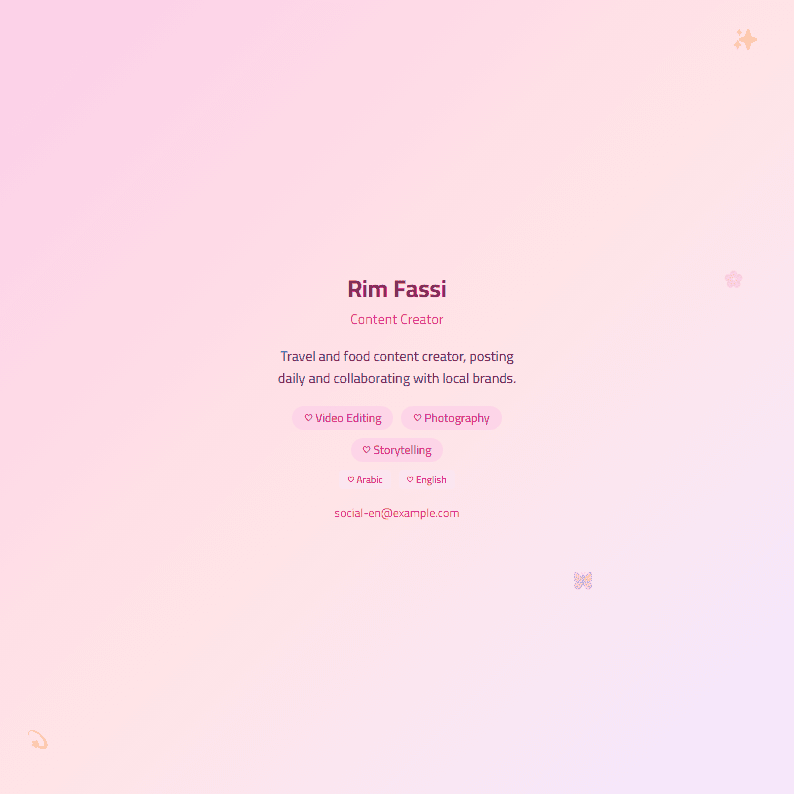
What Is the Instagram Girls CV Template?
The Instagram Girls template is a free, feminine resume design built around the soft, polished Instagram aesthetic: pastel gradients, rounded shapes, elegant headings and a photo-friendly layout. It is designed for creators, students and young professionals who want a CV that looks as curated as their feed while still being readable by recruiters and applicant tracking systems.
Unlike decorative-only designs, this template keeps a clean structure: contact block, profile summary, experience, education, skills and social links. You can start from it inside the CV editor and export a PDF in minutes.
Who Should Use This Template?
- Content creators and influencers who need a media kit style CV for brand collaborations.
- Students and graduates applying for internships in marketing, design, media or fashion.
- Beauty, lifestyle and fashion professionals who want a visually on-brand application.
- Social media managers who list Instagram, TikTok and analytics results.
If your target role is strictly corporate or academic, compare with the ATS Friendly template instead, or keep this design and apply it to a creative role only.
How to Build Your CV Step by Step
- Pick the template. Open the Instagram Girls template page and click to start editing.
- Add your header. Full name, city, professional email, phone and one or two social handles.
- Write a 3-line summary. Say what you create, who you create for and one measurable result.
- List experience with numbers. "Grew Instagram from 2K to 18K followers in 7 months" beats "managed social media".
- Add skills and tools. Content strategy, Reels editing, Canva, Meta Business Suite, copywriting.
- Check quality. Run the CV Score Checker before exporting.
- Export and send. Download as PDF, keep the file name like Name-Creator-CV.pdf.
Practical Tips for a Polished Result
- Keep the palette to two or three colors so the design stays elegant, not busy.
- Use a professional headshot with a clean background; the layout is photo-friendly.
- Balance visuals and text: recruiters still read the experience section first.
- If you apply through a job portal, scan your file with the ATS Resume Scanner to confirm the text is machine-readable.
- Tailor keywords to each job post with the Resume Keyword Optimizer.
- Keep it to one page if you have under five years of experience.
Common Mistakes to Avoid
The biggest mistake is treating the CV like a profile bio: emojis everywhere, no dates, no results. Recruiters need facts. Another mistake is hiding contact details inside an image, which breaks parsing. Keep all text as real text, add links as plain URLs, and always proofread names and dates. Finally, do not reuse the same file for every application; adjust the summary and skills for each role.
Make It Yours
The Instagram Girls template works best when it reflects your personal brand. Choose one accent color, one clear font pairing and one strong achievement per role. When you are ready, build the full document in the CV editor, then explore similar looks in the template gallery if you want a different mood.
Like this template?
Use this template now — Free100% Free
No registration or watermark
Multi-Format Export
PDF, Word, PNG, JPG
ATS Compatible
Templates specifically designed to pass ATS systems and increase your chances.