Boarding Pass CV Template – Free & Creative
Create a standout Boarding Pass CV in minutes. Free template, easy editor, ATS tips and PDF download. Turn your resume into a ticket to your dream job.
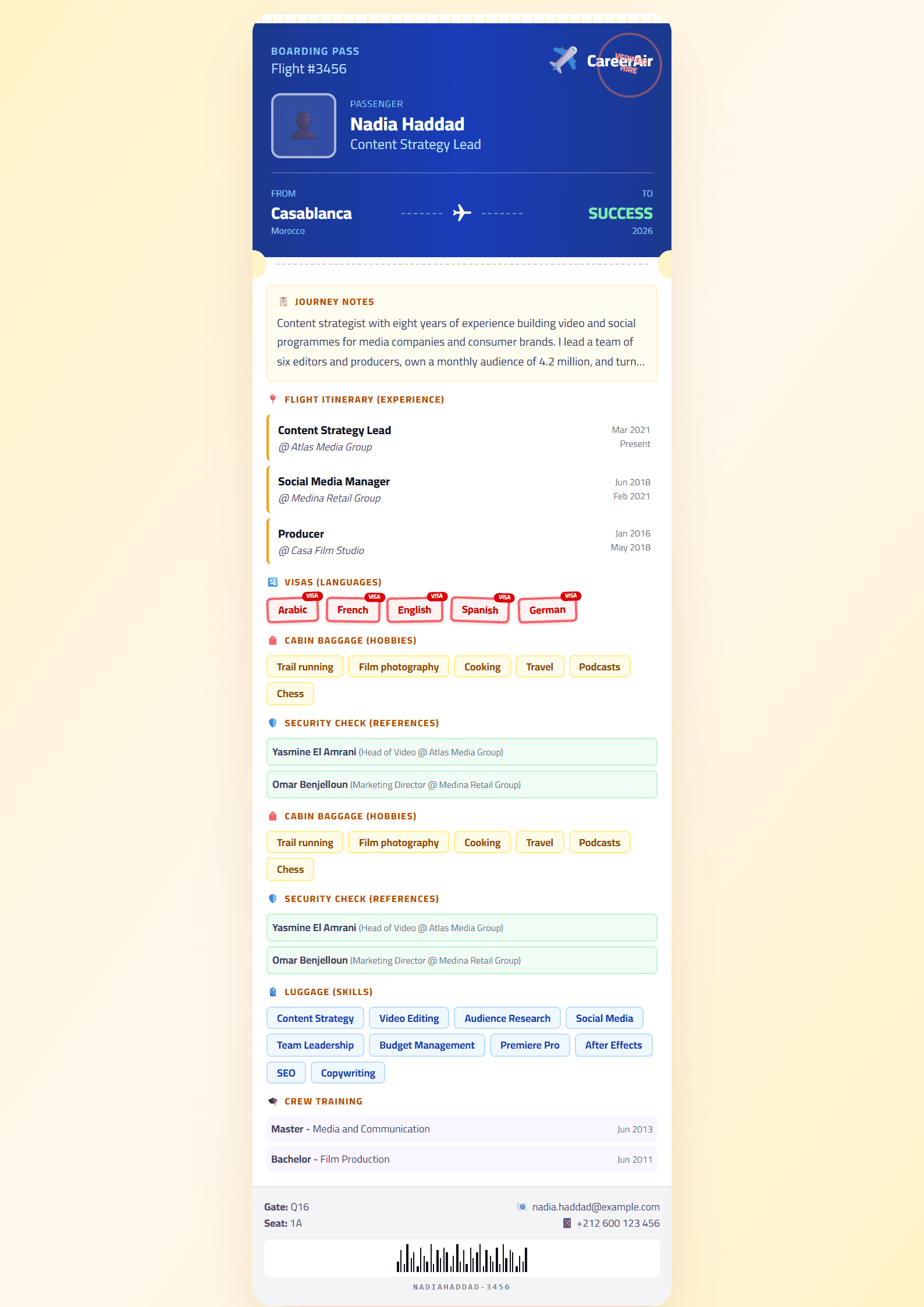
What Is the Boarding Pass CV Template?
The Boarding Pass CV template turns your resume into a travel ticket — a boarding pass to your dream job. Instead of a plain document, your experience, skills, and contact details are laid out like an airline boarding pass, complete with a departure gate, a destination field, and a barcode-style divider. It is a playful yet readable design that instantly signals ambition, mobility, and a global mindset.
This template is ideal for candidates who want to stand out in a stack of identical resumes without sacrificing clarity. It works especially well for people applying to travel, hospitality, aviation, logistics, tourism, and international companies, as well as anyone who has studied or worked abroad.
Who Should Use This Template?
- Travel and hospitality professionals — flight attendants, tour guides, hotel staff, and travel agents.
- International job seekers — anyone applying across borders or in multilingual teams.
- Students and graduates — a memorable first CV that shows personality.
- Creative and marketing roles — where visual storytelling is an advantage.
- Anyone who wants a themed CV that is still easy to read and scan.
If you prefer a more conservative look, compare this design with the Classic or Minimal templates before deciding.
How to Fill In the Boarding Pass Template Step by Step
- Open the editor. Go to the CV editor and select the Boarding Pass template.
- Fill the header. Put your full name where the passenger name goes, and your job title as the destination.
- Add your contact details. Email, phone, city, and LinkedIn replace the flight number and seat fields.
- Write your summary. Two or three lines explaining where your career is heading.
- List experience and education. Use reverse chronological order and keep each bullet to one or two lines.
- Add skills and languages. This is your baggage allowance — pack only what is relevant.
- Check and download. Review the layout, then export as PDF.
Practical Tips for a Strong Boarding Pass CV
Keep the boarding-pass metaphor light. Recruiters should understand your resume in six seconds, so never let the design hide the content. Use a clean sans-serif font, keep the barcode divider as a visual accent only, and make sure your job titles and dates are the most visible elements after your name.
Because the layout is decorative, always test it with an applicant tracking system. Run your draft through the ATS Resume Scanner and fix any parsing problems before you apply. You can also improve your wording with the Action Verb Enhancer and check the final score with the CV Score Checker.
Finally, tailor every application. Change the destination field to match the company or city you are targeting, and mirror the keywords from the job posting in your skills section. A themed CV is memorable, but a tailored themed CV is what gets the interview.
Common Mistakes to Avoid
- Overloading the ticket layout with too much text.
- Using low-contrast colors that disappear when printed.
- Forgetting to save the final file as a PDF.
- Leaving placeholder text such as "Gate" or "Seat" in the document.
- Sending the same version to every employer.
Done well, the Boarding Pass template gives your job search a clear identity and makes your resume genuinely enjoyable to read.
Like this template?
Use this template now — Free100% Free
No registration or watermark
Multi-Format Export
PDF, Word, PNG, JPG
ATS Compatible
Templates specifically designed to pass ATS systems and increase your chances.