Minimal CV Template – Clean & Elegant Resume
Build a clean, elegant resume with the free Minimal CV template. Simple single-column layout, ATS-safe, easy to edit and ready to download in minutes.
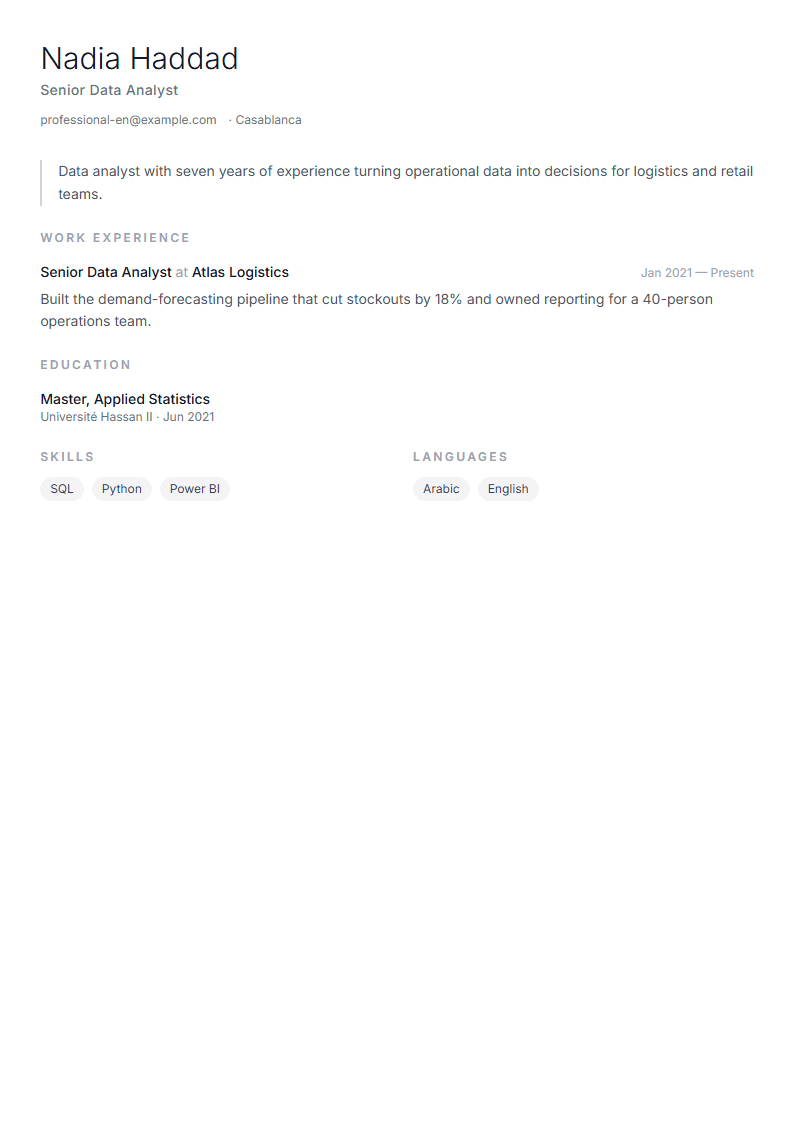
What Is the Minimal CV Template?
The Minimal template is a clean, elegant resume layout built on generous white space, a single-column structure and restrained typography. Instead of decorative graphics, it lets your achievements do the talking. The result is a document that looks calm and confident on screen and prints beautifully on plain A4 or Letter paper.
Because the layout avoids tables, text boxes and multi-column tricks, it is also one of the safest choices for automated screening systems. If you want to compare it with more structured options, browse the full templates library or open the ATS Friendly template for a more formal variant.
Who Should Use the Minimal Template?
Minimal design suits anyone whose experience needs room to breathe. It works especially well for:
- Mid-level and senior professionals with substantial achievements to list.
- Software engineers and designers who prefer clarity over decoration.
- Academics and researchers who need readable publication lists.
- Career changers who want the focus on transferable skills rather than job titles.
- Applicants in conservative industries such as law, finance and consulting.
If your field rewards visual flair, consider the Creative template instead, which allows colour and layout experimentation.
How to Build Your CV with the Minimal Template
- Open the editor. Go to the CV editor and select the Minimal layout from the template panel.
- Add your header. Keep it to your name, target job title, city, email, phone and one professional link.
- Write a three-line summary. State your years of experience, your specialty and one measurable result.
- List experience in reverse order. For each role use a job title, employer, dates and three to five bullet points.
- Quantify everything you can. Replace "responsible for sales" with "grew regional sales by 27% in 14 months".
- Add education, skills and languages. Keep skills to a scannable list of eight to twelve items.
- Check the score. Run your draft through the CV Score Checker before exporting.
Design Rules That Keep Minimal Looking Intentional
Minimalism fails when it looks unfinished. Follow these practical rules:
- Use one font family with two weights; never mix more than two typefaces.
- Set body text between 10 and 11.5 points and headings no more than 1.4 times larger.
- Keep margins at least 1.5 cm so the page does not feel cramped.
- Limit colour to one accent, ideally a dark grey or navy.
- Stay within one page for under ten years of experience, two pages beyond that.
- Align everything to a single left edge — no centred paragraphs.
Common Mistakes to Avoid
The biggest error is treating white space as wasted space and filling it with irrelevant detail. Delete hobbies, references and outdated certifications unless they directly support your target role. Another frequent mistake is inconsistent date formatting; choose "Mar 2021 – Present" and apply it everywhere. Finally, avoid generic phrases such as "hard-working team player" — replace them with evidence.
Adapting the Minimal Template for Different Goals
The same layout can serve several purposes. For a shorter version aimed at recruiters who skim, use the short CV builder. If you are applying to a company that uses automated screening, pair the Minimal look with ATS-safe wording. And if you simply want to see how a truly stripped-back resume looks, review the Minimal template page and duplicate it into your account as a starting point.
With a disciplined structure and honest, quantified content, the Minimal template produces a resume that recruiters read quickly and remember clearly.
Like this template?
Use this template now — Free100% Free
No registration or watermark
Multi-Format Export
PDF, Word, PNG, JPG
ATS Compatible
Templates specifically designed to pass ATS systems and increase your chances.