Classic Resume Template – Clean & Traditional CV
Build a clean, traditional resume with the free Classic CV template. Simple single-column layout, ATS-friendly, ready in Arabic, French and English.
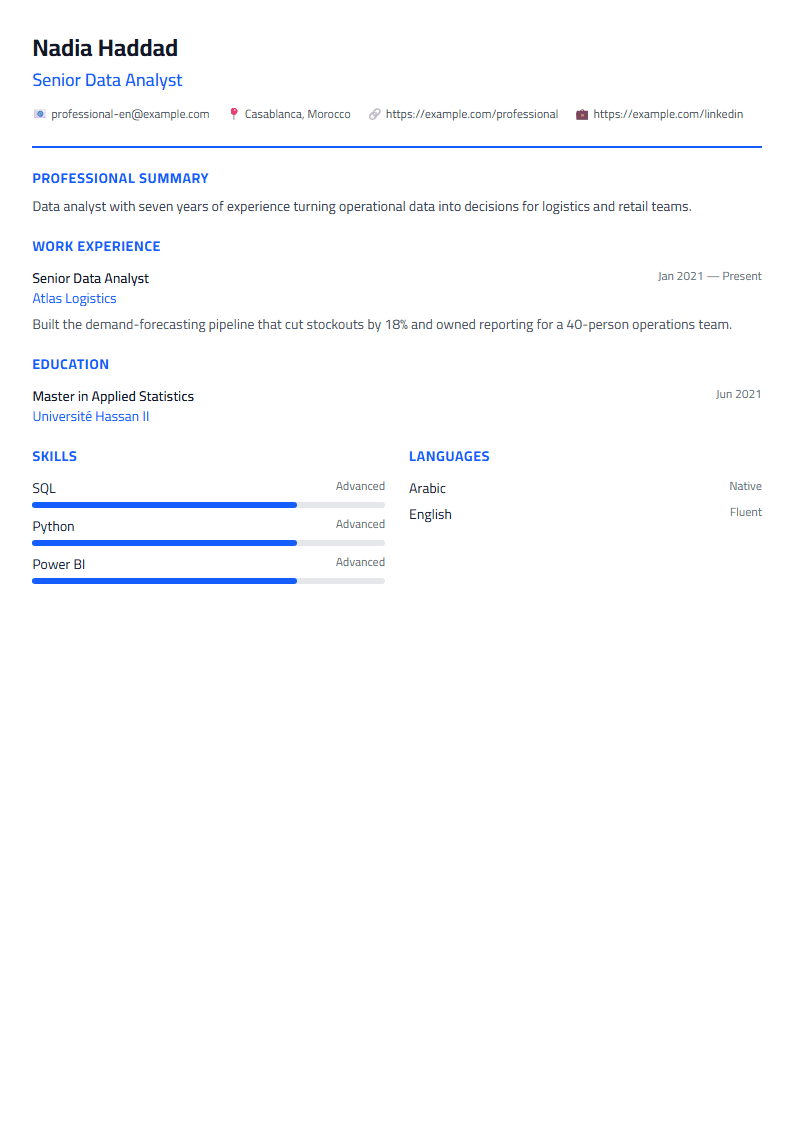
What Is the Classic Resume Template?
The Classic template is a clean, traditional resume layout built for job seekers who want to look professional without distractions. It uses a single-column structure, clear section headings, and conservative typography — the format recruiters have been reading for decades. Because nothing is hidden behind graphics or tables, every detail stays easy to scan in seconds.
If you are applying through large job boards, government portals, or corporate HR systems, this layout is a safe, dependable choice. You can open it directly in the CV editor and start typing right away.
Who Should Use the Classic Layout?
This template suits a wide range of candidates:
- Experienced professionals in finance, law, administration, engineering, and education.
- First-time job seekers who need a trustworthy structure to organize education and internships.
- Applicants in conservative industries where flashy design can hurt more than help.
- Anyone submitting to ATS software that prefers simple, linear text.
If you want a bolder look instead, compare it with the Modern template or the Minimal template before deciding.
How to Build Your Resume Step by Step
- Choose the template. Select Classic from the gallery and open it in the editor.
- Add your header. Write your full name, job title, phone, email, city, and a LinkedIn link if you have one.
- Write a short summary. Three or four lines describing your experience, strongest skill, and what you are looking for.
- List your work history. Use reverse chronological order and start each bullet with an action verb such as managed, built, or improved.
- Add education and skills. Keep skills relevant to the job posting and avoid generic filler.
- Proofread and export. Check spelling, then download the PDF and review it on a phone screen.
Practical Tips for Better Results
- Keep it to one page if you have under ten years of experience; two pages are fine beyond that.
- Quantify achievements. "Increased sales by 18%" beats "responsible for sales".
- Match keywords from the job description naturally inside your bullet points.
- Use consistent dates in the same format throughout, for example 03/2021 – 07/2023.
- Avoid photos and columns when applying to large companies that screen with software.
When you are done, run your draft through the CV Score Checker to catch missing sections and weak phrasing before you apply.
Classic vs. ATS-Friendly Templates
The Classic layout is already quite parser-friendly, but if you are targeting roles at tech companies or multinationals that filter with applicant tracking systems, take a look at the ATS Friendly template. It removes even the small decorative elements that occasionally confuse older parsers. Many candidates keep both versions ready: Classic for direct emails to hiring managers, ATS for online portals.
Final Thoughts
A resume does not need to be flashy to be memorable. Clear structure, strong verbs, and measurable results do the heavy lifting. The Classic template gives you that structure for free, in Arabic, French, or English, with no sign-up required. Build it once, update it every few months, and you will always be ready when an opportunity appears.
Like this template?
Use this template now — Free100% Free
No registration or watermark
Multi-Format Export
PDF, Word, PNG, JPG
ATS Compatible
Templates specifically designed to pass ATS systems and increase your chances.