Decorated CV Template — Ornate Elegant Resume | CV Brander
Build a decorated CV with ornate dividers and elegant typography. Free, editable, and ready to export — perfect for creative and design-minded professionals.
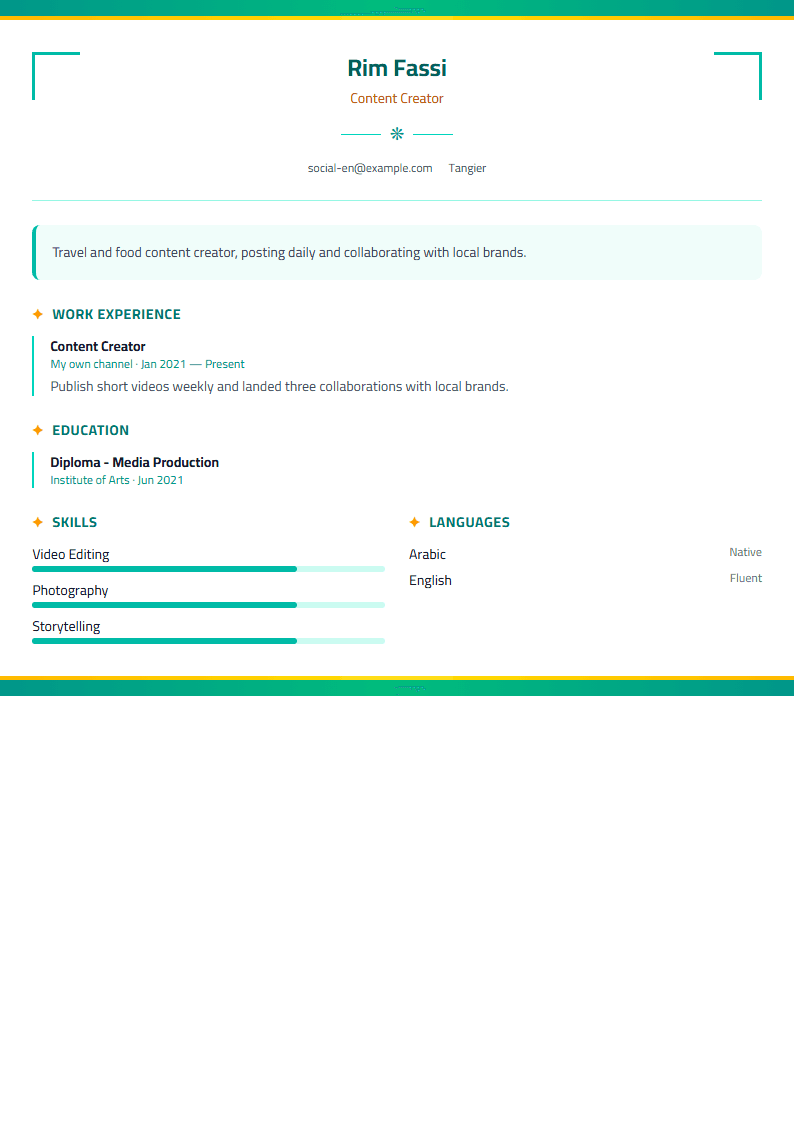
What Is the Decorated CV Template?
The Decorated template is an ornate, elegant resume design built for job seekers who want their application to feel personal, refined, and memorable. Instead of the flat, boxy layouts that dominate most job boards, it uses decorative dividers, delicate borders, and graceful typography to frame your experience like a well-set page. It is still a working document, not a poster: every section is structured so recruiters can scan your name, title, and achievements in seconds.
Decoration here is intentional, not noisy. The ornaments sit in the margins and between sections, so the words stay the star. If you have ever felt that a plain template erased your personality, this is the middle path between a strict corporate layout and a fully creative portfolio page.
Who Should Use It
The Decorated template suits people whose work involves taste, care, and presentation, and anyone applying in a field where a human reads the CV before software does.
- Designers, illustrators, and visual artists who want their CV to reflect their eye.
- Wedding planners, event stylists, florists, and boutique hospitality professionals.
- Beauty, fashion, and lifestyle brand specialists.
- Teachers, tutors, and educators who want a warm but organized document.
- Freelancers and creatives who apply directly to clients rather than through portals.
- Anyone in a bilingual market who needs the same elegant look in two languages.
If you are applying to a large company that screens with an ATS first, use a decor-free option such as the ATS Friendly template for that application and keep the Decorated version for direct email and networking.
How to Use It Step by Step
- Open the CV editor and select the Decorated template from the gallery.
- Fill in your header first: full name, target job title, city, email, phone, and one portfolio or LinkedIn link.
- Write a three-line professional summary that names your specialty, years of experience, and one measurable result.
- Add your experience in reverse-chronological order, with two to four bullet points per role, each starting with an action verb.
- List skills in two short columns so the decorative layout stays balanced.
- Add education, certifications, and languages. Keep each entry to one or two lines.
- Adjust the ornament density: fewer flourishes for conservative employers, more for creative ones.
- Export to PDF and check that the decorations do not overlap any text.
Practical Tips for a Decorated Resume
Ornament should support reading, never compete with it. Keep the body text in a clean serif or sans-serif at 10.5 to 11.5 points, and reserve the decorative face for your name and section headings only. Use no more than two colors: one deep neutral for text and one accent for rules and headings. Leave generous white space around every border so the page breathes.
Print your draft in black and white before sending it. Some recruiters still print, and a layout that depends on color can collapse into gray mush. If you are applying in more than one language, test the Bilingual layout so accents and right-to-left text render correctly. Finally, run your draft through the CV Score Checker to catch missing dates, weak verbs, and formatting warnings before you hit send.
Common Mistakes to Avoid
The most common error is over-decorating: three fonts, four colors, and a border on every section. Pick one visual motif and repeat it. The second mistake is hiding contact details inside an ornament where a scanner cannot read them. Keep your email and phone as plain text. The third is letting the design push your most recent job onto page two. Lead with your strongest, most recent role, and trim older positions to one line each.
Done well, a decorated CV tells the reader something before they finish the first sentence: that you notice details, that you care how things look, and that you understand your audience. That is exactly the impression a design-minded professional wants to leave.
Like this template?
Use this template now — Free100% Free
No registration or watermark
Multi-Format Export
PDF, Word, PNG, JPG
ATS Compatible
Templates specifically designed to pass ATS systems and increase your chances.