Pokémon CV Template — Free & Editable Resume
Build a playful Pokémon CV template for free. Editable online, ATS-checked, and ready to download as PDF in minutes. Gotta catch that job!
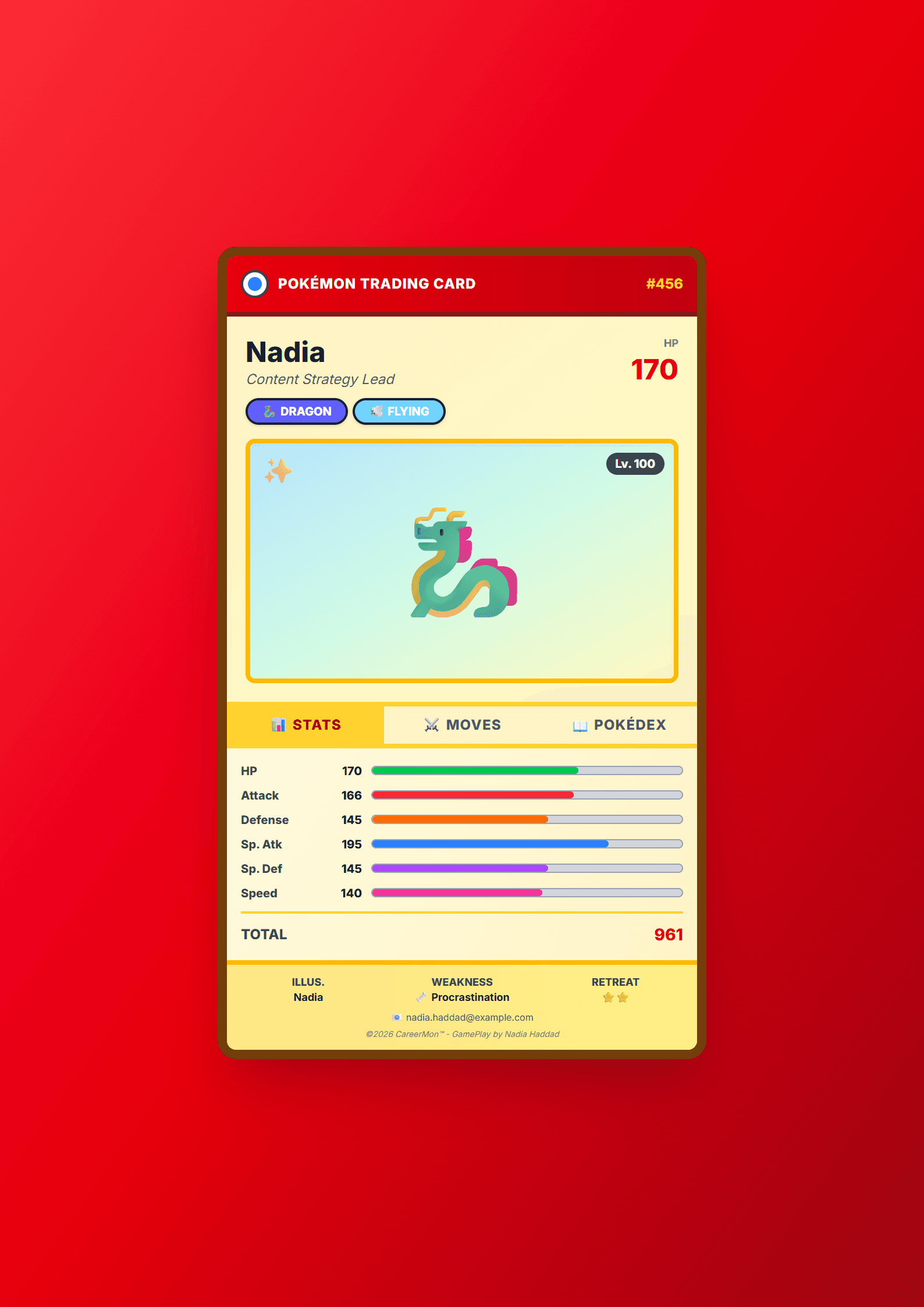
A CV Template That Actually Catches Recruiters
The Pokémon CV template from CV Brander turns the classic "gotta catch 'em all" energy into a resume that hiring managers remember. Instead of a plain white page, you get a playful, game-inspired layout with badges, energy bars and a clean structure that still keeps your experience, education and skills easy to scan. The tagline says it best: Gotta catch that job.
It is a free, online, editable template. You fill in your details in the browser, watch the preview update live, and download a polished PDF in minutes. No design skills required and no software installation.
Who Is This Template For?
This template works best for candidates who want personality without sacrificing professionalism:
- Gaming and esports professionals — streamers, moderators, tournament organizers, community managers.
- Students and recent graduates applying for internships or first jobs.
- Creatives in social media, content, design or marketing who need a memorable first impression.
- Anyone applying to a company with a playful culture — startups, studios, agencies and tech teams.
If you are targeting a conservative industry such as law, banking or government, pair this style with a safer layout. Browse the Classic template or the ATS Friendly template for those applications.
How to Build Your Pokémon CV Step by Step
- Open the editor. Go to the CV editor and select the Pokémon template from the gallery.
- Add your header. Write your full name, target job title, city, email, phone and a link to your portfolio or LinkedIn.
- Write a punchy summary. Three lines: who you are, your strongest skill, and the result you deliver.
- List your experience. Use action verbs and numbers. "Managed a 12,000-member Discord community and grew it 40% in six months" beats "responsible for community."
- Add skills and achievements. Group technical skills, tools and languages. Add badges, certifications or awards.
- Check ATS compatibility. Run your draft through the ATS Resume Scanner to make sure the playful design does not block automated parsing.
- Download and apply. Export as PDF, name the file Firstname-Lastname-CV.pdf, and send it.
Practical Tips to Make It Work
- Keep the theme subtle. One accent color and light icons are enough. The content must stay the star.
- Match keywords to the job ad. Mirror the exact terms the employer uses for tools, methods and titles.
- Quantify everything. Numbers, percentages and timeframes make your claims credible.
- Keep it to one or two pages. Recruiters spend seconds on the first pass.
- Test both versions. Compare a playful layout and a plain one with the CV A/B Testing tool and keep the winner.
- Tailor the summary per application. A generic summary is the fastest way to get filtered out.
Common Mistakes to Avoid
The biggest risk with a themed template is letting the theme overpower the message. Avoid oversized graphics, low-contrast text and decorative fonts in the body. Never hide contact details inside an image. Also avoid copying game terminology into real job titles — write "Community Manager," not "Gym Leader," unless the employer's culture clearly welcomes it.
Make It Yours
The Pokémon template is a starting point, not a cage. Swap the palette, remove elements you do not need and reorder sections so your strongest proof comes first. If you want a different vibe, explore the full templates gallery and compare layouts side by side. Then open the editor, fill it in, and go catch that job.
Like this template?
Use this template now — Free100% Free
No registration or watermark
Multi-Format Export
PDF, Word, PNG, JPG
ATS Compatible
Templates specifically designed to pass ATS systems and increase your chances.