Terminal CV Template — Command Line Resume Builder
Build a free Terminal CV template online: a command line style resume for developers, DevOps and data pros. Editable, ATS-friendly, no signup needed.
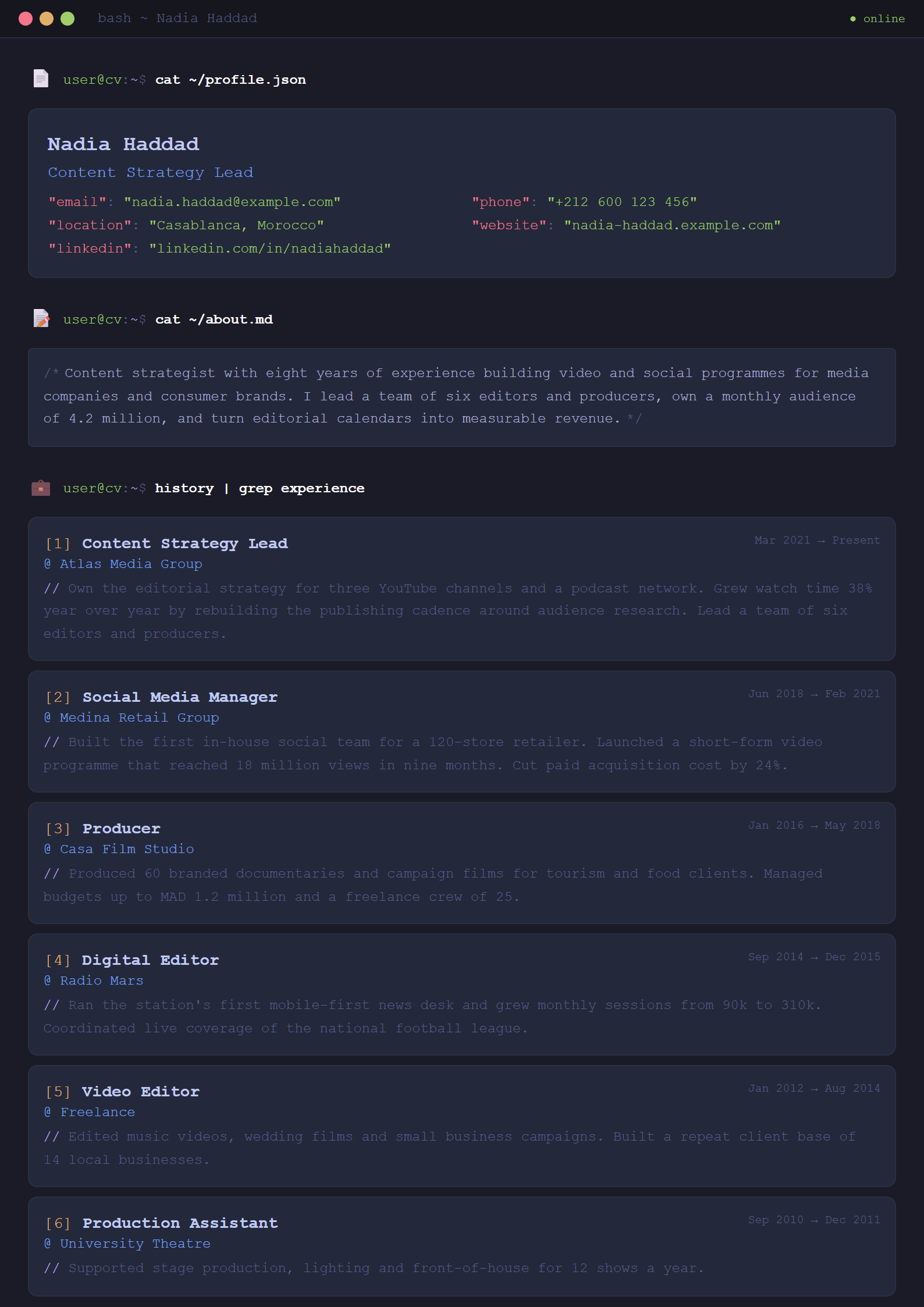
What Is the Terminal CV Template?
The Terminal template turns your resume into a command-line interface. Instead of the usual columns and headers, your experience, skills and education appear as clean monospaced lines, prompts and output blocks — the visual language of developers, sysadmins and data engineers. It is a free, online, editable CV template built for people who live in a shell and want a resume that says so before a recruiter reads a single word.
Because it keeps a strict single-column structure and plain text hierarchy, it also behaves well with applicant tracking systems. You can pair it with the ATS Resume Scanner to confirm that your file parses correctly before you apply.
Who Should Use This Template
- Software developers and engineers who want a resume that reflects their daily tools.
- DevOps, SRE and cloud professionals listing Linux, Bash, Docker, Kubernetes or CI/CD pipelines.
- Data scientists and analysts comfortable with Python, R, SQL and notebooks.
- Cybersecurity specialists who work in terminals all day long.
- Technical students and bootcamp graduates applying for their first junior role.
If your target job is deeply corporate or academic, a more conventional layout may serve you better — compare options in the templates gallery or look at the Classic and Academic designs. If you want the same technical credibility but a softer look, the ATS Tech Pro template is a strong alternative.
How to Build Your Terminal Resume Step by Step
- Open the editor. Go to the CV editor and select the Terminal template. No signup or download is required.
- Write your header as a prompt. Treat your name as the user and your target role as the command, for example "jane.doe — senior backend engineer".
- Convert jobs into output blocks. Put the company and dates on one line, then list 3–5 achievements underneath, each starting with a strong action verb.
- Quantify everything. Replace "improved performance" with "cut API latency by 42% across 12 services".
- Group skills like packages. Languages, frameworks, databases, cloud and tooling — short, scannable lines.
- Run a keyword check. Paste the job posting into the Resume Keyword Optimizer and add missing terms naturally.
- Export and test. Download the PDF, then verify it with the CV Score Checker.
Practical Tips for a Command-Line Style Resume
Monospaced fonts are wide, so keep lines under roughly 90 characters to avoid awkward wrapping. Use one accent color at most; the design already carries personality and heavy color will fight it. Avoid fake terminal gimmicks such as animated cursors or ASCII art banners — recruiters and parsers both dislike them. Keep bullet markers consistent, and never place critical information inside a graphic or table, because many ATS parsers drop it.
Because the layout is text-first, it translates well across languages. If you are applying in more than one market, use the Multi-Language CV Translator and keep a separate version for each region rather than mixing languages in one file.
Common Mistakes to Avoid
- Choosing style over substance: a clever template never compensates for weak achievements.
- Listing technologies without context — say what you built with them and what changed.
- Letting the resume run past two pages when you have under ten years of experience.
- Forgetting a plain-text version for job boards that strip formatting.
- Skipping proofreading: monospaced text makes typos more visible, not less.
Done well, the Terminal template signals precision, technical fluency and attention to detail — exactly the traits hiring managers look for in engineering roles. Build it once, tailor the keywords for each application, and keep the structure stable so you can update it in minutes.
Like this template?
Use this template now — Free100% Free
No registration or watermark
Multi-Format Export
PDF, Word, PNG, JPG
ATS Compatible
Templates specifically designed to pass ATS systems and increase your chances.