Wikipedia CV Template – Encyclopedia-Style Resume
Build a clean, encyclopedia-style CV with the free Wikipedia template. Perfect for researchers, writers and academics. Structured, credible, easy to edit.
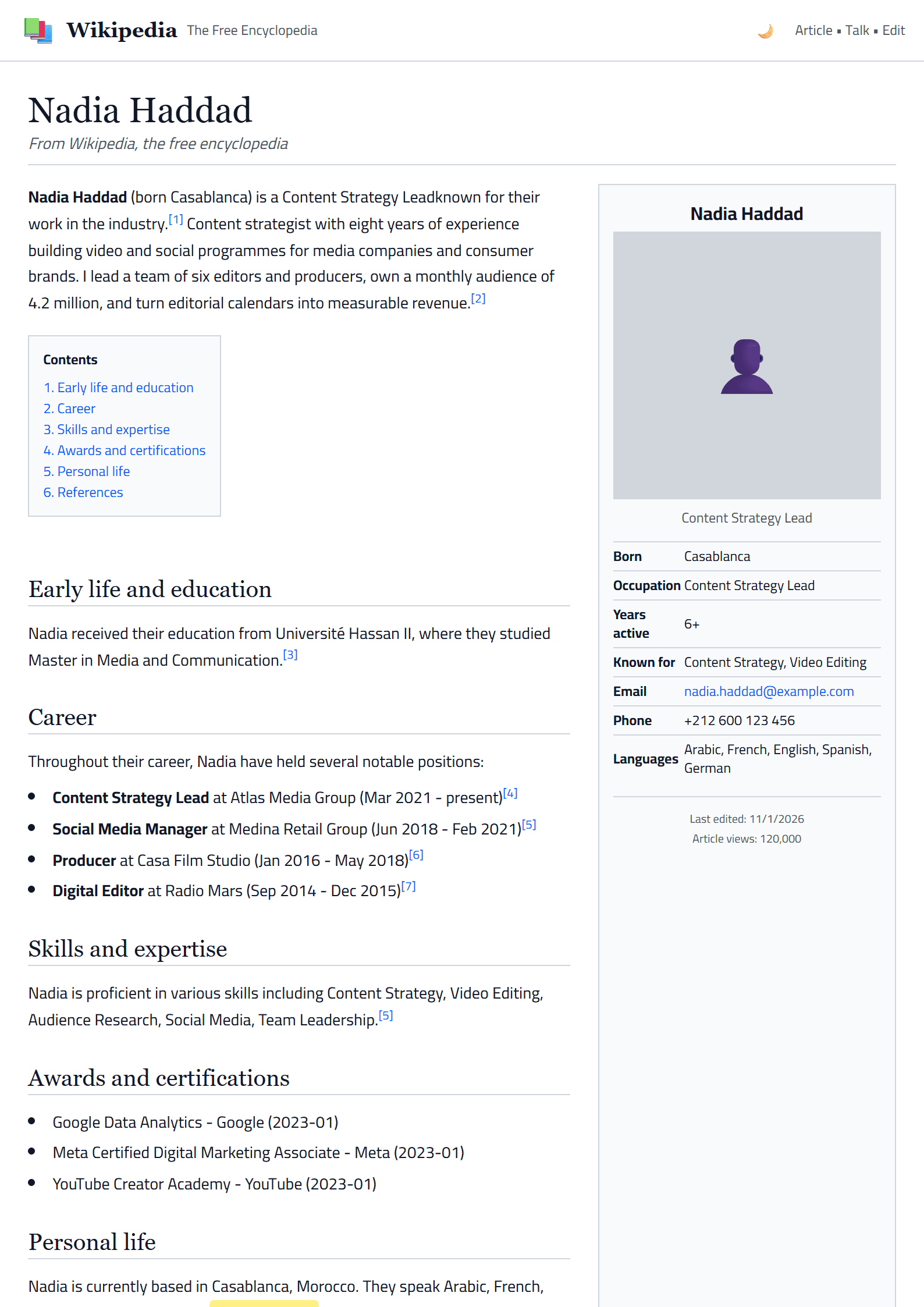
A CV That Reads Like an Encyclopedia Entry
The Wikipedia template turns your resume into a clean, encyclopedic document. Instead of flashy graphics, it borrows the familiar structure of an online encyclopedia: a clear title, a short lead paragraph that summarizes who you are, and well-labeled sections for experience, education, and skills. Recruiters instantly understand where to look, because the layout mirrors a format they already read every day.
This template is ideal for researchers, academics, editors, librarians, historians, and knowledge workers who want to present a long career in an organized, credible way. It also works well for anyone applying to writing, publishing, or documentation roles where clarity and structure matter more than decoration.
Who Should Use This Template
- Academics and researchers who need to list publications, grants, and teaching experience in a readable format.
- Writers and editors who want to show that they can organize information logically.
- Career changers with a long, varied history that needs a clear narrative.
- Knowledge professionals in museums, libraries, archives, and research institutes.
If your field values precision over style, this template speaks your language. Pair it with the Academic template if you need a more traditional scholarly layout, or explore the full templates index to compare options.
How to Build Your Wikipedia-Style CV Step by Step
- Write a strong lead paragraph. Summarize your profession, years of experience, and core specialty in three or four sentences, just like the opening of an encyclopedia article.
- Create an infobox-style summary. Add a short block with your name, title, location, and key credentials so readers can scan the essentials at a glance.
- Organize sections logically. Use headings such as Early Career, Professional Experience, Education, Publications, and Skills.
- Add internal cross-references. Mention tools, methods, or projects that link naturally to your portfolio or LinkedIn profile.
- Keep it factual. Replace adjectives with numbers: instead of "excellent writer," write "published 40 articles and edited 3 books."
- Proofread like an editor. Check dates, names, and titles carefully; consistency is what makes this format convincing.
Practical Tips for a Credible Layout
Use a serif font for headings to echo the classic encyclopedia feel, and keep body text in a clean sans-serif for readability. Stick to one accent color, such as deep blue or dark gray, and avoid decorative icons. Before sending your CV, run it through the ATS Resume Scanner to confirm that the structure survives automated parsing, and use the Readability Analyzer to keep sentences short and clear.
Finally, remember that an encyclopedia entry is neutral and evidence-based. Let your achievements speak for themselves, and your CV will feel authoritative without a single exclamation mark.
Like this template?
Use this template now — Free100% Free
No registration or watermark
Multi-Format Export
PDF, Word, PNG, JPG
ATS Compatible
Templates specifically designed to pass ATS systems and increase your chances.