Instagram CV Template - Free Social Media Resume
Build a free Instagram-inspired CV with a modern social media layout. Step-by-step guide, design tips and instant PDF export in English, Arabic and French.
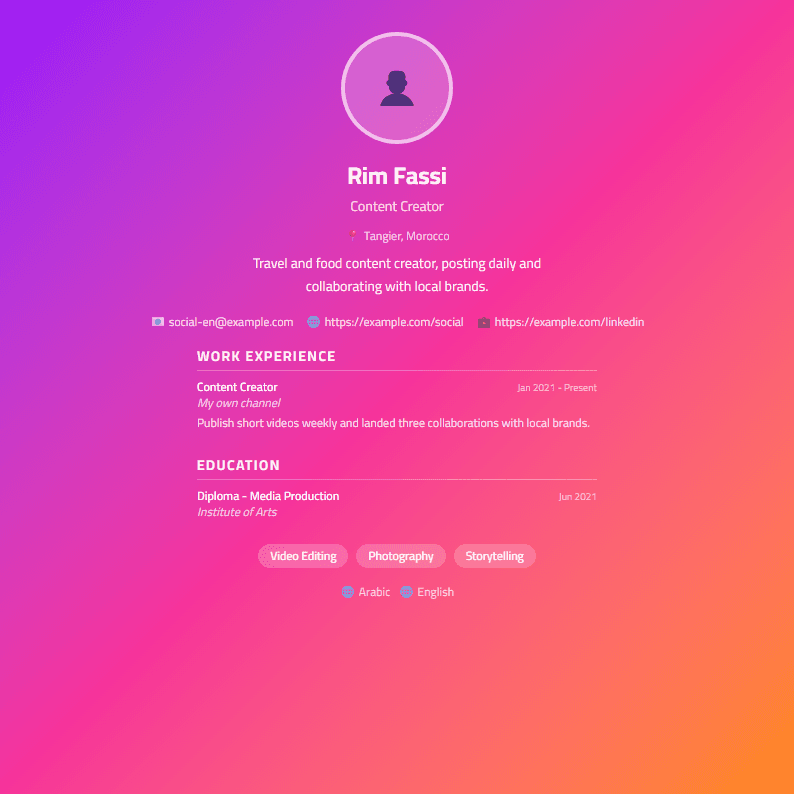
What Is the Instagram CV Template?
The Instagram CV template is a social-media-inspired resume layout built for people who present themselves visually and want a document that feels as modern as the platforms they use every day. Instead of the rigid, boxed sections of a traditional resume, this template borrows the grid rhythm, generous white space and clean typographic hierarchy of a social feed. The result is a CV that looks contemporary, reads quickly, and still holds every piece of information a recruiter or client needs.
It is available on CV Brander in Arabic, French and English, so you can build one version or all three without retyping your content. You can open the Instagram template directly and start editing in the browser, or browse the full template gallery if you want to compare layouts first.
Who Should Use This Template
This layout works best for profiles where visual identity and online presence genuinely matter:
- Content creators and influencers who list follower counts, engagement rates and brand collaborations.
- Social media managers who need to show campaign results, tools and platform expertise.
- Photographers, designers and videographers whose portfolios live on visual platforms.
- Marketing and community specialists applying to agencies, startups or e-commerce brands.
- Students and freelancers who want a fresh, memorable first impression without a heavy design background.
If you are applying to a large corporation, a law firm or a government body that screens with strict software, pair this design with a plain version from the ATS-friendly CV page and keep the styled one for direct emails and creative roles.
How to Build Your Instagram CV Step by Step
- Open the editor. Go to the CV editor and select the Instagram layout.
- Write a profile headline. Replace a generic objective with one line that states what you do and for whom, for example: Social Media Manager helping food brands grow on Instagram.
- Add a short bio. Two or three sentences about your niche, your results and the platforms you know best.
- Turn experience into numbers. Instead of managed social accounts, write Grew an Instagram account from 4K to 52K followers in 9 months with a 6.2% average engagement rate.
- List tools and platforms. Meta Business Suite, Canva, CapCut, Later, Hootsuite, analytics dashboards, basic photo and video editing.
- Add a portfolio block. Link your handle, a personal website or a PDF portfolio. Use the Portfolio Builder if you do not have one yet.
- Check and export. Run the CV Score Checker, fix weak phrasing, then download as PDF.
Design Tips That Keep It Readable
- Choose one accent color and use it only for headings and dividers.
- Keep body text at 10-11 pt and headings at 14-16 pt.
- Leave 1.5 cm to 2 cm margins so the page does not feel crowded.
- Use icons sparingly, and only if they are instantly understandable.
- Keep the resume to one page if you have under eight years of experience.
- Save the final file as PDF so fonts and spacing stay exactly as designed.
Common Mistakes to Avoid
The biggest mistake is treating a resume like a social profile. Recruiters do not need your last vacation photo or a list of hashtags; they need evidence that you can deliver results. Avoid decorative fonts, low-contrast gray text on gray backgrounds, and long paragraphs. Also avoid copying your Instagram bio word for word, because a bio is written for followers while a CV is written for hiring managers and clients. Finally, never send a screenshot or an image-only file: many applicant tracking systems cannot read text inside images, so always export a real text-based PDF.
Matching Your CV to the Right Opportunity
One template cannot cover every situation, and that is fine. For creative agencies and brand partnerships, the Instagram layout is a strong choice. For corporate marketing departments, use a cleaner version such as the Minimal template or the Modern template. If you work across two languages, the Bilingual template lets you present Arabic and English side by side. Build the version that fits the role, keep your numbers accurate, and update the file every time you hit a new milestone.
Like this template?
Use this template now — Free100% Free
No registration or watermark
Multi-Format Export
PDF, Word, PNG, JPG
ATS Compatible
Templates specifically designed to pass ATS systems and increase your chances.