Instagram Decorated CV Template – Free & Stylish
Create a stylish Instagram Decorated CV for free. Decorative layout, editable sections, and instant PDF export – perfect for creators and creative roles.
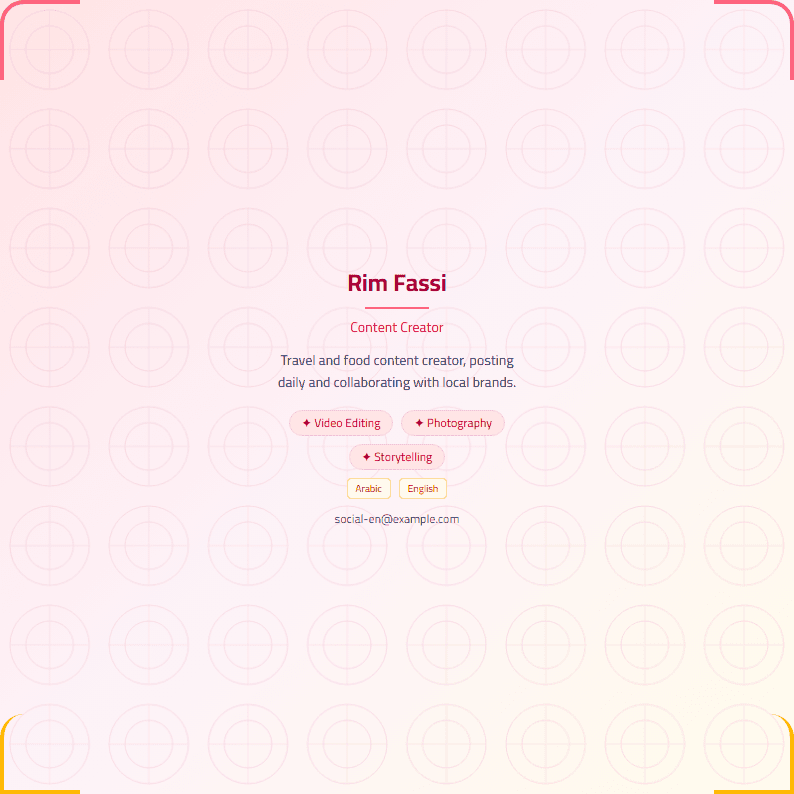
What Is the Instagram Decorated Template?
The Instagram Decorated template is a visually rich CV layout designed to feel like a curated Instagram feed: soft frames, decorative dividers, and elegant typography that make your profile stand out without sacrificing readability. Instead of a plain white document, you get a polished, scroll-stopping design that mirrors the aesthetics people already love on social media. It is built inside the free CV Brander editor, so you can edit every section in real time and export when you are ready.
This template works for anyone who wants a personal brand that feels warm, stylish, and modern — creators, students, freelancers, and anyone applying to roles where personality matters.
Who Should Use This Template
Instagram Decorated is ideal for:
- Content creators and influencers who need a media kit or one-page profile that matches their feed.
- Students and recent graduates applying to creative, marketing, or media internships.
- Freelancers in design, photography, beauty, or lifestyle who want a portfolio-style CV.
- Job seekers in social media management, branding, or customer-facing roles.
If you are applying to a highly corporate or ATS-driven position, pair this with a more conservative layout such as the ATS Friendly template and keep the decorated version for creative submissions.
How to Use It Step by Step
- Open the template in the editor and choose your language — English, Arabic, or French.
- Fill in your header: name, title, short tagline, and contact links (email, Instagram handle, portfolio).
- Write your summary in 2–3 lines that describe your niche and what you offer.
- Add experience and projects with bullet points that start with action verbs.
- List skills and tools relevant to your field, grouped logically.
- Preview and export as PDF, then test it on mobile to make sure it looks clean.
Practical Tips for a Strong Decorated CV
- Keep decoration in the header and section dividers — never behind your text.
- Limit fonts to two: one decorative for headings, one clean for body text.
- Use color accents that match your personal brand, but keep contrast high.
- Keep the document to one page unless you have 5+ years of experience.
- Run a quick check with the Readability Analyzer to make sure your wording stays clear.
If you want a softer, more feminine version of the same idea, explore the Instagram Girls template. For a bolder, more graphic look, try the Instagram template or the glamorous Luxury template.
Common Mistakes to Avoid
Decoration should support your content, not replace it. Avoid oversized icons, low-contrast pastel text, and decorative fonts in the body. Also skip photos that look unprofessional — a clean headshot or a simple monogram works better than a casual selfie. Finally, always proofread: a beautiful layout with typos still loses the job.
Make It Yours
The Instagram Decorated template is a starting point. Swap the accent colors, adjust the spacing, and rewrite each section until it sounds like you. When your CV feels like an extension of your Instagram profile, recruiters remember it — and that is exactly the goal.
Like this template?
Use this template now — Free100% Free
No registration or watermark
Multi-Format Export
PDF, Word, PNG, JPG
ATS Compatible
Templates specifically designed to pass ATS systems and increase your chances.