PUBG CV Template — Free Gaming Resume Builder
Build a free PUBG CV template with gaming stats, esports experience and a winner winner chicken dinner style. Edit online, no signup, download as PDF.
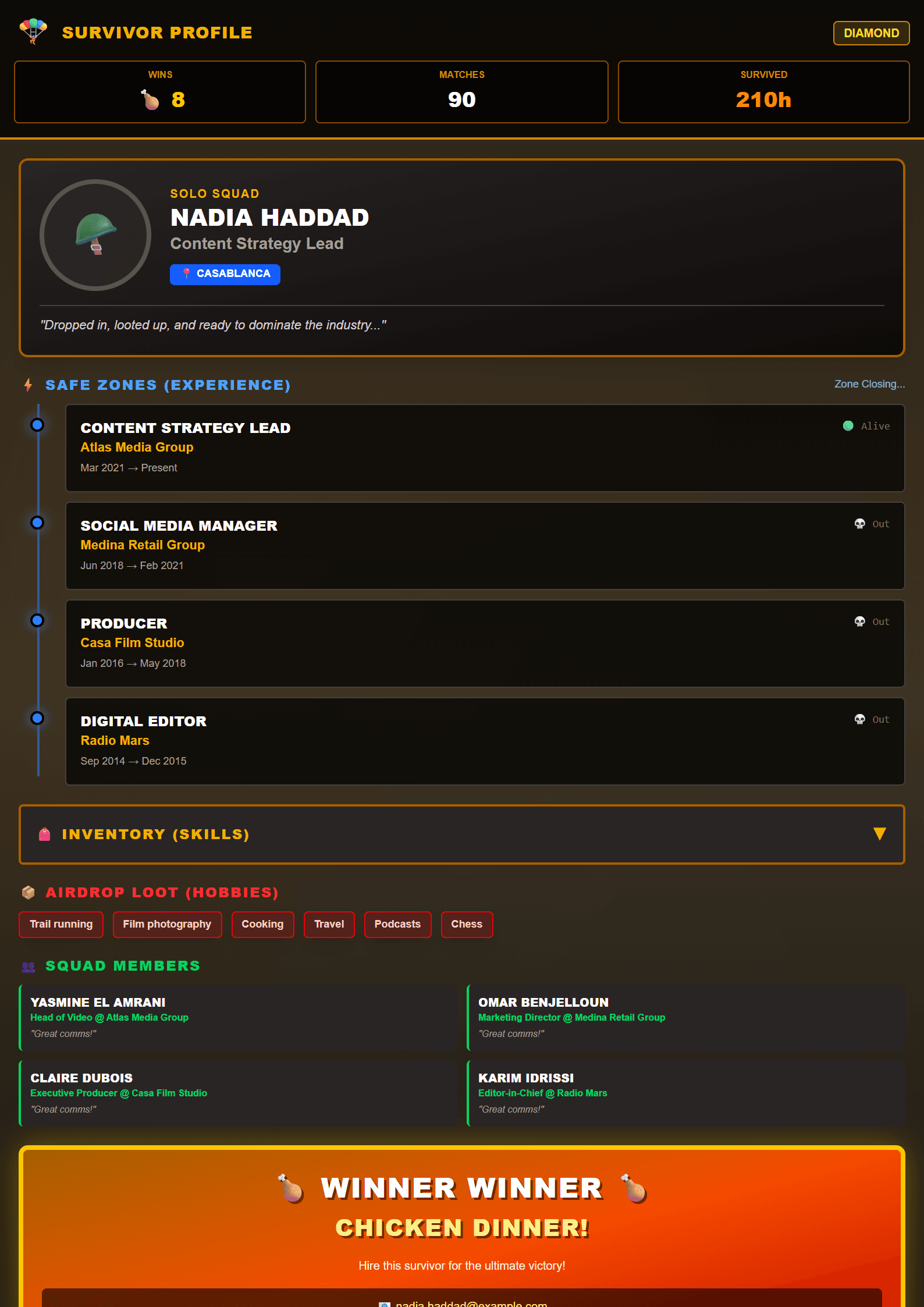
What Is the PUBG CV Template?
The PUBG CV template from CV Brander turns the most iconic battle royale phrase in gaming — "Winner winner chicken dinner" — into a resume layout that instantly says you are a gamer who knows how to grind, adapt and win. It is a free, fully editable template that mixes bold typography, a drop-zone-inspired header and clean, readable sections for your experience, education and skills. Whether you are applying for an esports team, a game-testing gig or your first retail job, this template gives your application a personality that recruiters actually remember.
Because it is built inside the CV Brander editor, you can create the whole document online, no download, no signup, no watermark. If you want something more neutral for corporate roles, you can switch to a Classic template at any moment without losing your text.
Who Should Use This Template
The PUBG template is made for people whose gaming life is a real asset, not a secret. That includes:
- Esports and competitive players who want to show tournament placements, rank and team history.
- Streamers and content creators who need a media-kit style resume with audience numbers and platform links.
- Aspiring game testers and QA applicants who want to prove deep knowledge of shooters and patch cycles.
- Students and first-job seekers who want a memorable, low-risk way to stand out in a pile of plain documents.
- Community managers and moderators who have managed Discord servers, clans or tournaments.
If you are applying to a bank, a law firm or a government office, keep the same content but move to a ATS Friendly template so the layout stays machine-readable.
How to Build Your PUBG Resume Step by Step
- Open the template. Go to the PUBG template page and click to start editing in the CV Brander editor.
- Write a headline that lands. Instead of "Student", try "Competitive FPS Player — Top 500 EU Squad, 1,200+ hours".
- Add your gaming achievements as work experience. Treat tournaments, clan leadership and streaming like jobs: role, team, dates, and measurable results.
- Use numbers everywhere. K/D ratio, average damage, win rate, viewers per stream, subscribers, prize money, Discord members moderated.
- List transferable skills. Team communication, decision-making under pressure, map analysis, coaching, video editing, OBS, Discord moderation.
- Add a short summary. Three lines that connect your gaming discipline to the job you are targeting.
- Check ATS compatibility. Run your draft through the ATS Resume Scanner before you send it.
- Export and apply. Download as PDF for humans, keep a plain version for online forms.
Practical Tips That Make the Difference
- Never lie about rank or results. Recruiters in esports verify everything, and one fake placement ends the conversation.
- Translate gamer language. "Shot-caller" becomes "led a 4-person team and coordinated real-time strategy" for non-gaming employers.
- Keep it to one or two pages. If your content is thin, use the Short template to keep everything on a single clean page.
- Match keywords to the job post. If the ad says "game testing" and "bug reporting", those exact words should appear in your resume.
- Add links, not screenshots. A Twitch, YouTube or Steam profile link is more useful than a picture of your stats screen.
- Proofread the final PDF. Export, reopen it, and check that no text is cut off on mobile.
Why a Themed Template Can Beat a Plain One
Most applicants send the same grey, generic document. A themed template like PUBG signals cultural fit immediately: it tells a gaming company that you live in their world, and it tells a non-gaming employer that you are confident enough to have a personality. The trick is balance — keep the visual theme, but keep the writing professional. Use the AI Resume Summary Writer if you are stuck on your opening paragraph, then rewrite it in your own voice.
Final Checklist Before You Hit Send
- Contact details correct and clickable.
- Summary tailored to the exact role.
- Every achievement backed by a number.
- No typos, consistent dates, no empty sections.
- PDF exported and tested on a phone.
Ready to cook? Open the CV editor, pick the PUBG layout and turn your chicken dinners into a career.
Like this template?
Use this template now — Free100% Free
No registration or watermark
Multi-Format Export
PDF, Word, PNG, JPG
ATS Compatible
Templates specifically designed to pass ATS systems and increase your chances.