Twitter / X CV Template — Free Modern Resume Layout
Build a modern Twitter / X style CV for free. Editable timeline-inspired resume template with step-by-step tips, ATS-safe structure and instant PDF export.
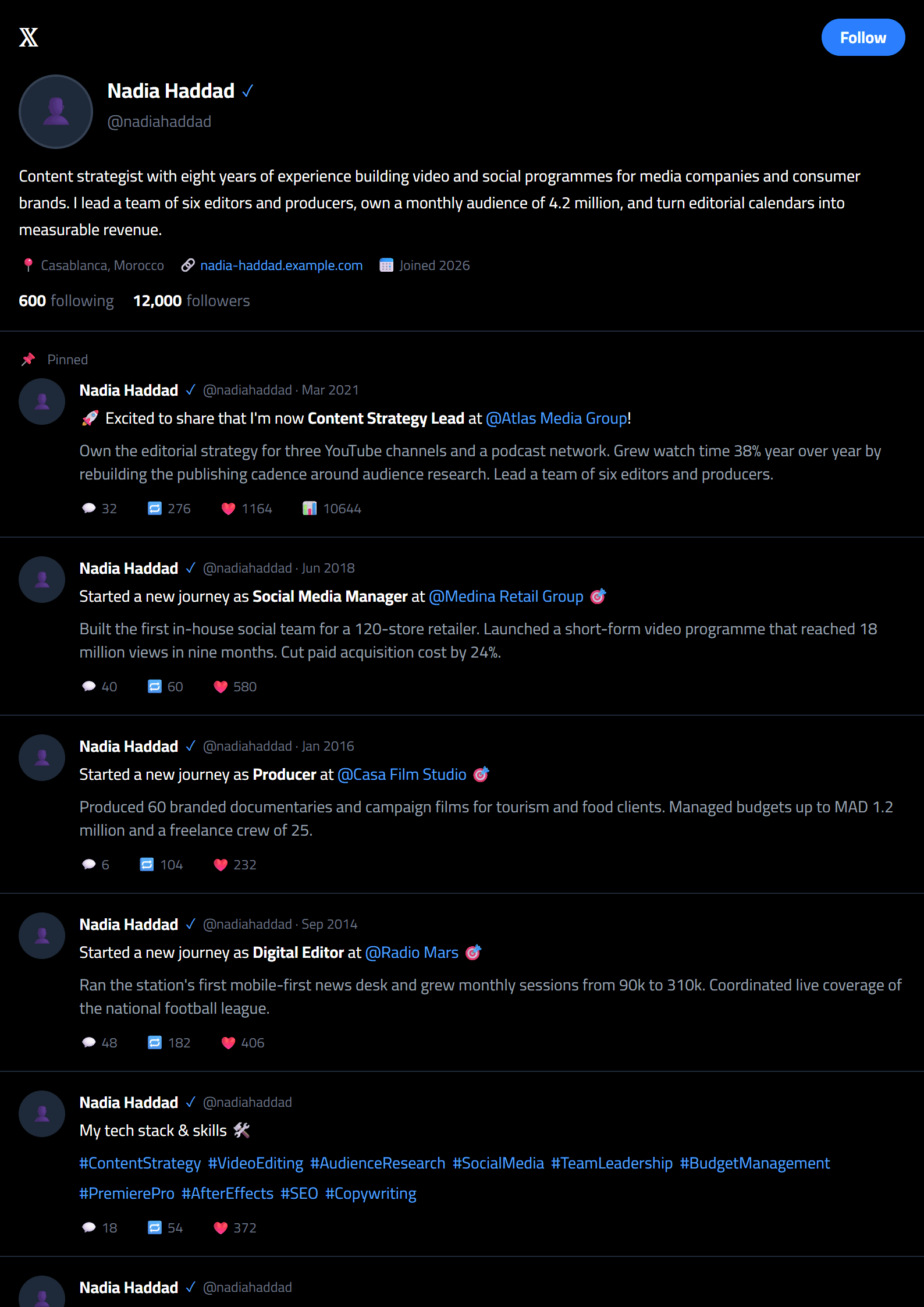
What Is the Twitter / X CV Template?
The Twitter / X CV template is a modern, timeline-inspired resume layout built for professionals who live and work online. Instead of dense blocks of text, it organizes your experience like a clean feed: a short profile header, a scannable summary, and clearly separated sections for skills, experience, and achievements. It is a free, fully editable template inside the CV Brander editor, so you can customize every line without downloading extra software.
Because recruiters now spend only a few seconds on a first scan, a layout that mirrors the rhythm of a social profile feels instantly familiar. The result is a CV that looks contemporary while still passing automated screening.
Who Should Use This Template
This template works best for digital-first candidates who want their personality to show without sacrificing professionalism:
- Social media managers and content creators who want a CV that reflects the platforms they work with daily.
- Community managers and growth marketers whose results are measured in engagement and reach.
- Junior developers, designers, and freelancers who need a clean, modern first impression.
- Career changers moving into tech, media, or remote-first companies.
If you are applying to a very conservative field, you may prefer the Executive template or a strict ATS Friendly layout. For everyone else, the Twitter / X style gives you a memorable edge.
How to Build Your CV Step by Step
- Open the template. Go to the Twitter / X template page and click to start editing.
- Write your header. Add your name, target job title, city, email, phone, and portfolio or handle links.
- Craft a short summary. Two or three lines that state who you are, what you do, and the value you bring.
- List your experience. Use reverse chronological order with achievement bullets, not just duties.
- Add skills and tools. Group them logically: platforms, software, languages, and soft skills.
- Check and export. Run the CV Score Checker and download your PDF.
Practical Tips for a Stronger CV
- Quantify everything. "Grew followers from 4K to 38K in eight months" beats "managed social accounts."
- Keep it to one page unless you have more than ten years of experience.
- Use keywords from the job ad. Mirror the exact terms the employer uses, especially for tools and platforms.
- Skip photos and graphics if you are applying through a large applicant tracking system.
- Proofread out loud. Reading your CV aloud catches awkward phrasing that silent reading misses.
- Tailor each version. A generic CV rarely wins; a targeted one usually does.
When your resume is ready, pair it with a matching cover letter using the Cover Letter Generator so your whole application looks consistent.
Common Mistakes to Avoid
The biggest mistake is treating the social-inspired design as permission to be casual. Keep the tone professional, avoid slang, and never use emojis in place of real achievements. Another frequent error is burying the most relevant experience under unrelated jobs. Lead with what the employer needs. Finally, do not forget file naming: save your CV as Firstname-Lastname-CV.pdf so recruiters can find it again in a crowded inbox.
Like this template?
Use this template now — Free100% Free
No registration or watermark
Multi-Format Export
PDF, Word, PNG, JPG
ATS Compatible
Templates specifically designed to pass ATS systems and increase your chances.