Fortnite Resume Template — Free Gamer CV Builder
Build a free Fortnite-style resume for esports, streaming and gaming jobs. Editable template, instant PDF download, no sign-up required.
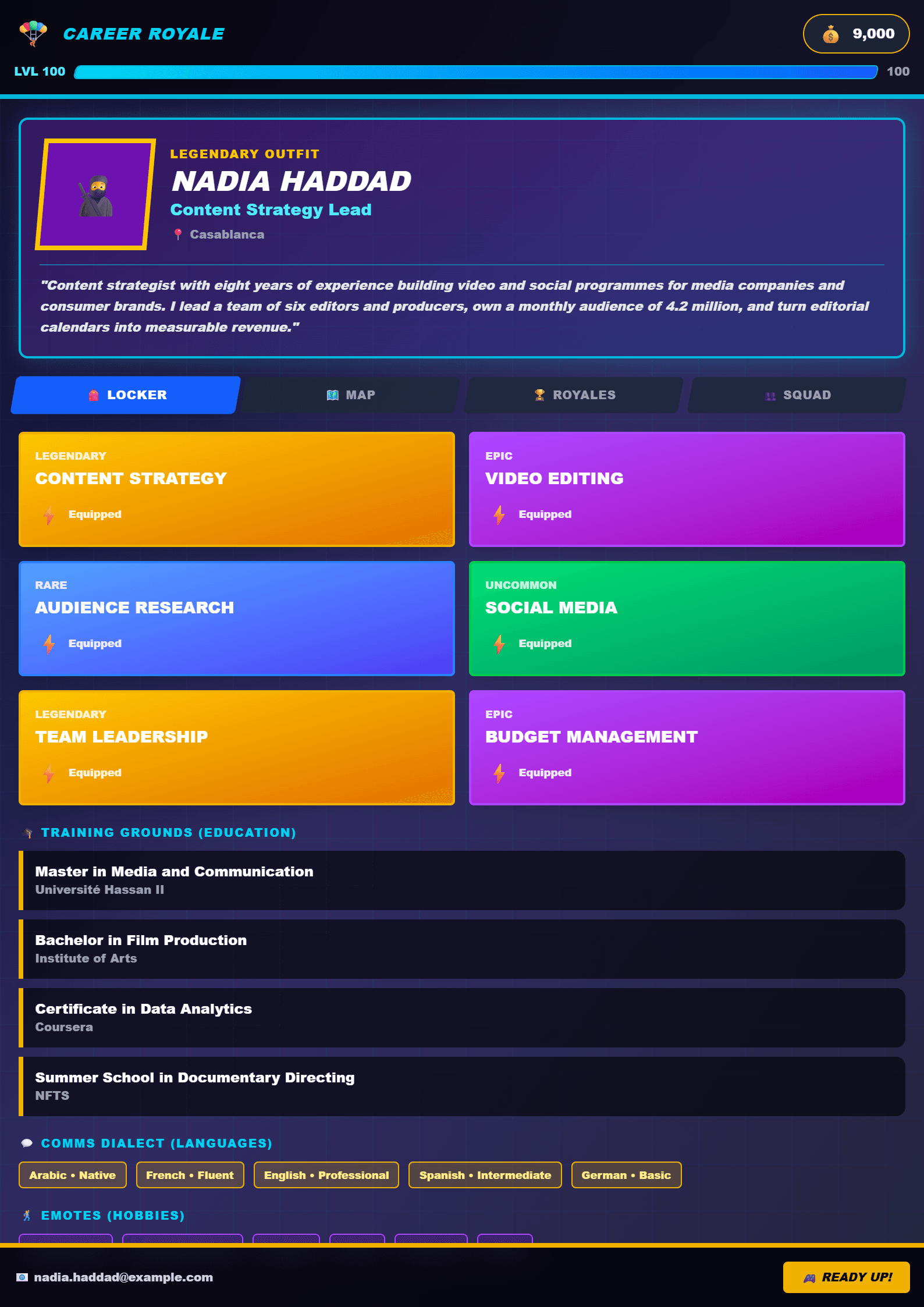
What Is the Fortnite Resume Template?
The Fortnite template on CV Brander is a battle-royale-inspired CV design built for gamers, esports players, streamers and content creators who want a resume that feels as energetic as their favorite game. Instead of the usual grey blocks of text, this layout uses bold headings, a victory-royale-style header and clearly separated "loot" sections for skills, experience and achievements. It is fully editable in the browser, so you can fill it in, preview it and download a polished PDF in minutes.
If you like the style but want something calmer, compare it with the Call of Duty template or a more neutral Modern template.
Who Should Use This Template?
This design works best for people whose experience lives in gaming culture:
- Esports competitors who list tournaments, placements and team roles.
- Twitch, YouTube and TikTok streamers who want to show audience growth and content stats.
- Game testers, moderators and community managers applying to studios or agencies.
- Students and first-job seekers who want a memorable CV that still reads professionally.
Recruiters in gaming and media companies see hundreds of plain resumes. A themed layout signals that you understand the industry you are applying to — as long as the content itself stays clear and honest.
How to Fill It In Step by Step
- Open the Fortnite template page and click the edit button to load it in the CV editor.
- Start with the header: your real name, your role (for example "Esports Player — FPS") and contact details.
- Write a three-line summary. Mention your main game, your rank and one measurable result.
- Add an "Achievements" section with numbers: tournament placements, follower growth, average viewers, win rate.
- List your skills in two columns — technical (editing, OBS, analytics) and soft (team communication, discipline).
- Add work or volunteer experience, even if it is not gaming-related. Part-time jobs show reliability.
- Check the layout on mobile, then download the PDF and keep the editable version for future updates.
Practical Tips for a Strong Gamer CV
Theme is decoration; content is what gets you hired. Keep these rules in mind:
- Use numbers everywhere. "Grew channel from 0 to 12K followers in 8 months" beats "good at streaming".
- Translate gaming language. Instead of "carried the squad", write "coordinated a 4-player team and improved win rate by 22%".
- Keep it to one or two pages. If your CV grows too long, switch to the Short template or trim older entries.
- Add a link section. Twitch, YouTube, Discord portfolio and LinkedIn all belong in one clean list.
- Test the readability. Run your text through the Readability Analyzer so recruiters can scan it in seconds.
- Prepare a plain version. Some companies use ATS software; keep an ATS Friendly template ready as a backup.
Common Mistakes to Avoid
Do not fill the page with game logos you do not own, and never invent tournament results — the gaming community is small and easy to verify. Avoid nicknames as your main name; use your real name and put your gamertag in brackets. Finally, do not use dark backgrounds with light text if you plan to print, and always export a PDF rather than sending screenshots.
Make It Yours
When you are done, review the whole document once more, ask a friend to proofread it, and save a copy for every application you send. You can also explore the full templates library to find a second style for corporate or academic roles. A great CV is like a good match: prepared, focused and finished with confidence.
Like this template?
Use this template now — Free100% Free
No registration or watermark
Multi-Format Export
PDF, Word, PNG, JPG
ATS Compatible
Templates specifically designed to pass ATS systems and increase your chances.