Netflix Resume Template — Free & Editable CV
Create a binge-worthy Netflix style resume with CV Brander. Free, editable template with episode-style roles and a skills row recruiters love.
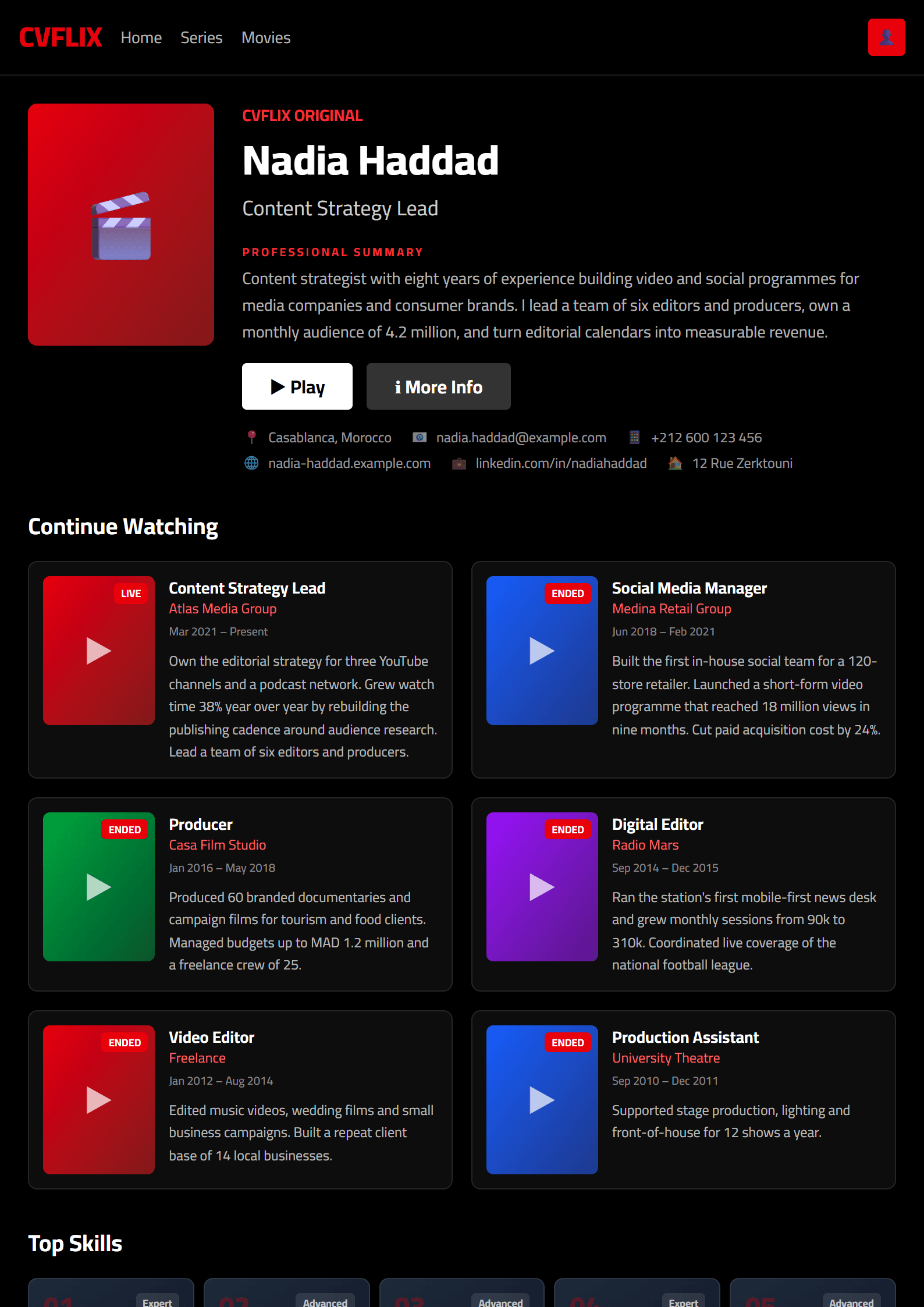
What Is the Netflix Resume Template?
The Netflix resume template on CV Brander turns your career story into a binge-worthy, streaming-style profile. Instead of a dry list of duties, it presents your experience like a curated catalog: a bold hero section, episode-style role cards, and a "Top Picks for You" skills row that recruiters can scan in seconds. It is a playful yet professional layout designed for candidates who want to stand out in a crowded applicant pool without sacrificing readability.
Because the structure follows a clean single-column reading order, the template also plays nicely with applicant tracking systems. If you are targeting corporate roles, pair it with our ATS Friendly template or run a final check with the ATS Resume Scanner before you apply.
Who Should Use This Template
The Netflix template works best for people whose work is visual, narrative, or portfolio-driven. It is a natural fit for:
- Content creators, video editors, and social media managers who already speak the language of streaming platforms.
- Product, marketing, and brand professionals who want to show campaign results as "titles" with measurable ratings.
- Career changers who need a memorable format to reframe unrelated experience into one coherent story.
- Students and junior candidates applying to media, entertainment, and tech companies.
If your industry is conservative — law, banking, academia — keep the content but switch the layout. The Executive template or the Classic template will carry the same achievements with a more traditional tone.
How to Build Your Resume Step by Step
- Open the editor. Go to the CV editor and select the Netflix template from the gallery.
- Write your hero line. Use the headline area for a one-sentence positioning statement, for example: "Growth marketer who turns cold audiences into 2M+ monthly viewers."
- Turn jobs into episodes. For each role, add the company, dates, and three bullet points that start with a strong verb and end with a number.
- Add a Top Picks row. List 6–10 skills, tools, or certifications that match the job posting word for word.
- Insert a "Continue Watching" section. Use it for ongoing projects, courses, or freelance clients to show momentum.
- Export and test. Download the PDF, then upload it to the CV Score Checker to confirm formatting and keyword coverage.
Practical Tips for a Binge-Worthy Result
Theme is seasoning, not the meal. Recruiters still spend about seven seconds on the first pass, so keep the top third of the page dense with value: your target title, years of experience, and two headline achievements. Use the streaming metaphor sparingly — one or two labels such as "Top Picks" or "New Releases" are enough. Everything else should read like normal professional language.
Quantify aggressively. "Managed social accounts" becomes "Grew TikTok from 12K to 310K followers in 9 months." Numbers are the ratings that make hiring managers press play. Keep the palette and typography consistent, avoid images that break ATS parsing, and save the file as FirstName-LastName-Resume.pdf.
Finally, tailor every application. Mirror the job description's exact keywords in your skills row and summary, and keep a master copy in the editor so you can duplicate and adjust it in minutes. A resume that feels custom-made always outperforms a generic one — even a very stylish generic one.
Related Tools and Templates
Explore the full templates library for other bold layouts, or compare this design with the Spotify template if you want a music-inspired alternative. Both are free, editable, and export-ready in one click.
Like this template?
Use this template now — Free100% Free
No registration or watermark
Multi-Format Export
PDF, Word, PNG, JPG
ATS Compatible
Templates specifically designed to pass ATS systems and increase your chances.